Make the best decision, not just a guess.

Describe what you can choose and what limits you. Atmost finds the best answer in one click, then explains it in plain language. No code, no cell references.

Free · macOS 11 or later · Apple Silicon and Intel

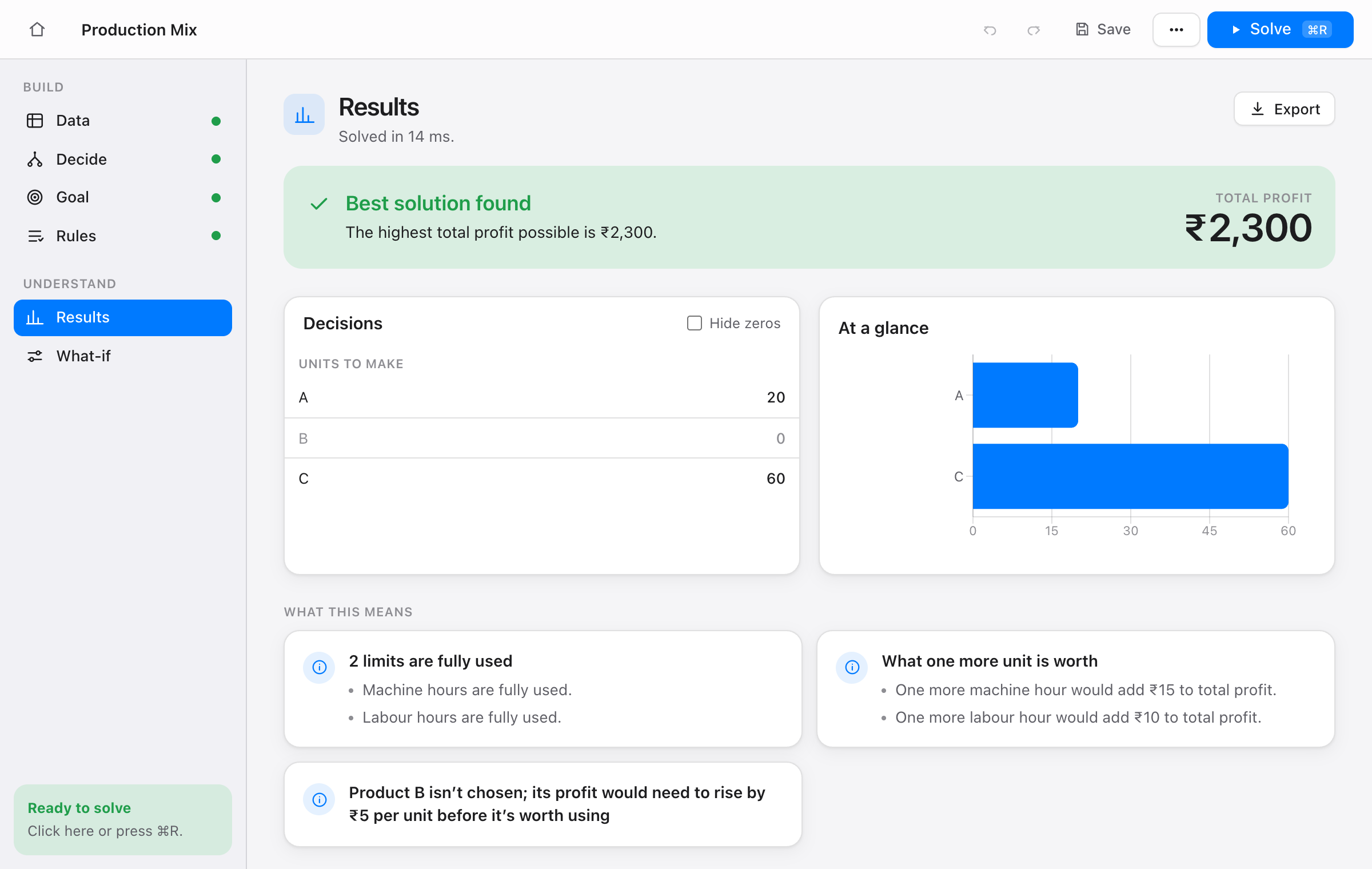
Atmost showing a solved production-planning model with the answer explained in plain words
✎

Say it in tables and lists

Products, machines, cities: list them once, fill in the numbers, and set your goal and rules as sentences. Paste straight from Excel or import a CSV.

✓

Answers you can explain

See what to do, what is fully used, what is spare, and what one more unit would be worth, all written as sentences you can put in a report.

⚠

Never a silent “no solution”

When rules clash, Atmost names the conflicting rules and how far they would have to bend. Mistakes in your data point to the exact cell.

From question to answer in five steps

The sidebar works as a checklist, so you always know what is left.

  1. DataLists and tables of your numbers
  2. DecideWhat you can choose: any amount, whole number or yes/no
  3. GoalMake as much as possible, or spend as little
  4. RulesAt most, at least or exactly
  5. SolveOne click, ⌘R. Then slide numbers to try what-ifs

Private because it never leaves your Mac

Atmost runs the open-source HiGHS solver inside the app. There is nothing to sign up for and nothing to upload.

  • Works offline. Solve on a plane, a train or a campus with poor Wi-Fi.
  • No account, no cloud, no telemetry.
  • No AI guesses. Every explanation comes from fixed rules, so the same model always gives the same words.
  • No lock-in. Export to Python (PuLP), the standard .lp format, or Excel at any time.

Built for real course problems

Start from a template and change the numbers:

  • Production mix
  • Transportation
  • Assignment
  • Diet
  • Staff scheduling (whole numbers)

Checked against known answers

Each template is compared with a hand calculation, a textbook value or an independent solver.

ProblemOptimal valueChecked against
Production mix2,300Hand calculation
Transportation153.675Dantzig’s textbook value and SciPy
Assignment13Brute force over all 24 assignments
Diet116.1918SciPy
Staff scheduling23SciPy milp (whole numbers matter here)
Wyndor Glass36Textbook

Get Atmost

Free for Mac. Open the .dmg, drag Atmost to Applications, and you are ready.

Download for Mac

Version 0.1.0 · Free · Notarized by Apple · Updates itself

Questions

Is it really free?

Yes. Atmost is free to download and use. There is no account and no trial period.

What kinds of problems can it solve?

Linear problems, where amounts can be any number, and mixed-integer problems, where some choices must be whole numbers or yes/no. That covers production planning, blending, transport, assignment, scheduling and similar course and business problems. It does not solve curved (non-linear) problems.

How big a model can it handle?

There is no variable cap like Excel Solver’s 200. Very large whole-number models will take longer, because the solver runs on your own machine.

Does it work on Windows or iPad?

Not yet. Atmost is Mac-only for now.

Can I use the results in a report or assignment?

Yes. Results and explanations are written as plain sentences, and you can export the model to Excel, to Python (PuLP) or to the standard .lp format to check it elsewhere.

macOS says it cannot open the app.

Download only from this page. If macOS still blocks it, open System Settings → Privacy & Security and choose “Open Anyway”, then tell us so we can fix it.